
Work orders bring together the work your team must perform, its status and the people responsible. The workspace controls the available order types, states, actions and labels.
Find an order
Open Orders and use the list or Board to find the job. Confirm the customer and public reference before changing it. The board groups orders by their configured state.
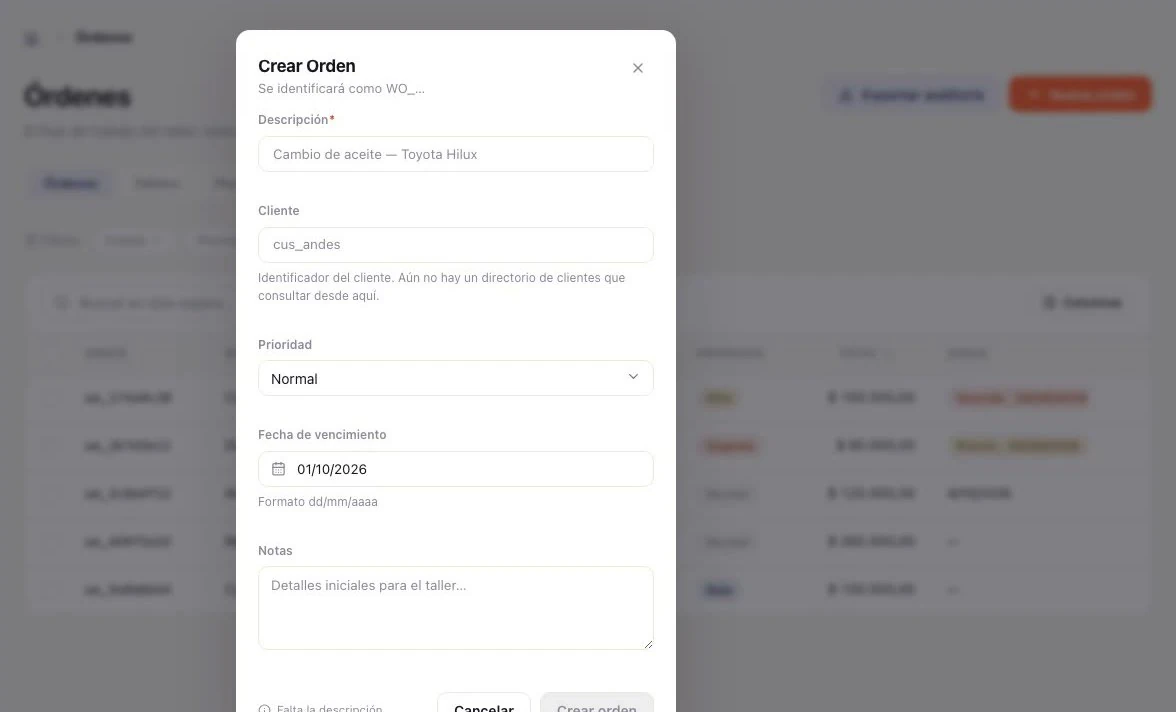
Create or update an order
- Choose New order.
- Select the order type or module instance when required.
- Link the customer and the relevant service or equipment record.
- Add the work description and review the initial data.
- Assign responsibility where available and save.
- Reopen the order and confirm the saved details.
Follow the workflow
Use the actions shown by the order’s current state. Record what has happened, then select the next allowed action. A missing transition can mean a required field, earlier step, module setting or permission is missing.
Depending on configuration, the detail can include lines, quotes, documents, notes, time, checklists, crew, payments and procurement. Confirm quantities, prices and recipients before actions that affect customers or money.
Suppliers and parts
When procurement is enabled, use the order’s procurement area to follow required parts, supplier requests and received items. Receiving goods and recording a supplier invoice are separate operations; review the relevant status before advancing the order.
For repeated work, use recurring templates.
Use Receive supplier deliveries for partial quantities, stock locations and discrepancies.
Delivery and after-sale scenarios
For the complete workflow—partial delivery, full return before invoicing, refund after payment or replacing one part—see Deliveries, returns and replacements →. It explains what the screen can record and how to coordinate partial cases.
Module settings
The Settings → Modules → Work orders → Configure screen offers seven controls: time tracking, checklists, crews, priorities, SLA, default SLA and auto assignment. The rest of the options in this table are just as real — they change what an order asks for and which tabs appear — but they are not on that screen: they belong to your workspace’s module configuration, so confirm them with whoever administers the installation. Exact availability can vary by instance. The initial value is off unless stated otherwise.
| Setting | Initial value | Effect |
|---|---|---|
auto_invoice_on_complete | Off | Creates an invoice when work is completed. Requires invoicing. |
require_customer | Off | Requires a customer. Configure customer_entity_type before enabling it. |
require_subject | Off | Requires a subject record, such as an asset or equipment. Configure subject_entity_type. |
validate_entity_refs | Off | Checks that customer and subject records exist in Entities. |
require_catalog_item | On | Requires each line to use an active catalog item. Turning it off allows free-text lines. |
time_tracking_enabled | Off | Enables time logging, starting, stopping and listing. |
time_tracking_default_billable | On | Marks new time as billable by default; each entry can be changed. |
time_tracking_auto_labor_line | Off | Rolls billable time into a labor line on the order. Set the default rate before enabling it. |
bulk_operations_enabled | Off | Enables bulk assignment, status changes and closing. bulk_operations_max_batch_size limits the batch. |
sla_enabled | Off | Enables due dates and SLA tracking. Also configure sla_default_hours. |
sla_business_hours | Off | Counts working hours for SLA; when off, elapsed time counts. An explicit due_at remains an absolute time. |
attachments_enabled | Off | Enables upload, listing and deletion of work order attachments. |
activity_feed_enabled | Off | Enables the per-order activity timeline. |
activity_include_internal | Off | Includes internal notes in the activity timeline. Check who can read it. |
recurring_work_orders_enabled | Off | Enables recurring work templates and scheduled materialization. |
backorder_enabled | Off | Allows a line shortfall to be recorded when stock is insufficient. |
backorder_auto_reserve_on_restock | On | Automatically reserves shortages when stock arrives; when off, reconcile manually. |
procurement_on_backorder | Off | Creates a procurement request when a shortage is recorded. Requires a configured supplier flow. |
relationships_enabled | Off | Enables relationships such as blocks, depends on or duplicate. |
relationships_block_start | On | Prevents starting an order while an order blocking it remains open. Applies only when relationships are enabled. |
priority_enabled | Off | Enables urgent, high, normal and low priorities. |
checklists_enabled | Off | Enables work order checklists and subtasks. |
crews_enabled | Off | Enables multiple technicians per order; crew membership also widens assigned-order read access. |
quote_approval_enabled | Off | Requires quote approval before work can start. |
self_service_enabled | Off | Lets customers request, reschedule and cancel their own work orders within their own scope. |
skills_enabled | Off | Checks that an assignee has the skills required by the order. |
reviews_enabled | Off | Allows a customer rating and comment after work is finished. |
split_payments | Off | Allows multiple payments against an order invoice, up to the outstanding balance. |
rma_enabled | Off | Enables returns of parts to suppliers; this differs from returning stock to your own inventory. |
kit_explosion_enabled | Off | Expands a kit item into component lines and reserves stock for each component. |
Important combinations
- Required and validated customer: configure the customer entity type, create or activate it in Entities, then enable
require_customerand, if you want existence checks,validate_entity_refs. - Time that flows into the invoice: enable
time_tracking_enabledandtime_tracking_auto_labor_line; set the default rate and reviewtime_tracking_default_billable. - SLA using working hours: enable
sla_enabled, set the SLA hours and turn onsla_business_hours. An explicitly entered due date does not become a business-hours deadline. - Shortages and purchasing: enable
backorder_enabled; choose whether shortages are reserved automatically when stock arrives (backorder_auto_reserve_on_restock) and whether to create a supplier request (procurement_on_backorder). - Order dependencies: enable
relationships_enabled; leaverelationships_block_starton if an open blocking order must prevent work from starting. - Crew and access: enable
crews_enabledonly when multiple assignees are needed; then check which roles can read orders assigned to their crew.
Switches do not grant permissions. After configuring them, test the workflow with a test record and confirm the resulting state in the relevant work order, catalog or invoice.
If something doesn’t work
Work orders is an optional module and needs Invoicing, Documents and Entities. Read access has three different scopes — all, your own, or assigned — so seeing fewer orders than a colleague can be correct. Creating, assigning, invoicing, generating documents and refunding are separate permissions. Which tabs appear also depends on the module configuration, not only on your role.